> ## Documentation Index
> Fetch the complete documentation index at: https://semgrep-ee9d73d8-abhijna-tec-605-update-docs-to-clarify-cla.mintlify.site/llms.txt
> Use this file to discover all available pages before exploring further.
# Triage and remediate Supply Chain findings
**PREREQUISITE**
At least one repository that scans for dependencies through Semgrep Supply Chain. See [Scan third-party dependencies](/semgrep-supply-chain/set-up-and-configure).
Once Semgrep Supply Chain successfully scans your repository and you've [viewed your results](/semgrep-supply-chain/findings), you can assess, triage, and remediate the findings presented in Semgrep AppSec Platform using the **Supply Chain** page. Semgrep provides the following methods to help you evaluate your findings:
| Assessment action | Method |
| :--------------------------------------------------------------------------------------------------------------------- | :------------------------------------------------ |
| Filter findings. | Click any filter on the **Supply Chain** page. |
| View specific CVE entries in cve.org. | Click the finding's CVE badge. |
| View specific pattern matches in your codebase. | View the Supply Chain finding's **Details** page. |
| View the [dependency path for a transitive dependency](/semgrep-supply-chain/dependency-search#dependency-paths-beta). | View the Supply Chain finding's **Details** page. |
| View safe versions to upgrade your dependencies. | View the Supply Chain finding's **Details** page. |
Once you've assessed the findings, the following actions are available to you.
## Remediate true positives
Remediate (or resolve) true positives in Semgrep Supply Chain by:
* Updating the dependency to a safe version that does not contain the vulnerability.
* Removing the dependency and refactoring all usages in the codebase.
## Review provisionally ignored findings
Provisionally ignored findings are those identified by Semgrep as unreachable. These findings block pull requests and merge requests if the corresponding rule is included in a blocking policy.
You can change the status of provisionally ignored findings to indicate the next steps in the triage process. For instance, you can set the status to **Reviewing** if you decide to manually review the finding.
### Remove the dependency and refactor the code
Removing dependencies and refactoring code are other methods to remediate vulnerabilities. Upon merging any dependency removals, Semgrep Supply Chain scans the pull request or merge request, detects changes to your manifest file or lockfile, and updates the status to **Fixed**.
## Upgrade guidance and Autofix (beta)
If the remediation for a finding is to upgrade the package, **Upgrade guidance** uses program analysis and AI to analyze the results of your Semgrep scans to see if you can safely and reliably update a vulnerable package or dependency to a fixed version. From there, you can choose to:
* Have Semgrep open a pull request or merge request that updates the version used by your repository and guide the developer on any breaking changes in the PR description
* Create a Jira ticket
* Set the finding's triage status as **To fix**
Semgrep's dependency upgrade guidance can determine if the package upgrade needed to remediate the finding causes breaking changes. Semgrep can then create a PR to upgrade the package, offering a one-click solution to you.
### Supported languages and package managers
* **JavaScript** projects
* **Python** codebases with the following package managers:
* `pip`
* `pip-tools`
* `pipenv`
* `poetry`
* `uv`
### Supported SCMs
* GitHub Cloud
* GitLab Cloud
### Registry support
Public npm and PyPI registries are supported. Private PyPI registries are also supported.
See [Connect a private registry to Semgrep](#connect-a-private-registry-to-semgrep).
### Prerequisites
To access all upgrade guidance and Autofix features, you must have:
* Enabled upgrade guidance in Semgrep AppSec Platform by going to **Settings > General > Supply Chain**
* At least one repository with full [scans with Semgrep Supply Chain](/semgrep-supply-chain/set-up-and-configure).
* Semgrep Multimodal [enabled](/semgrep-multimodal/getting-started).
* The **private** GitHub app for Semgrep installed. The app must have [**Read and write** access on the **Contents** permission](#grant-read-and-write-access-to-a-private-github-semgrep-app) to open Autofix PRs. Current customers must manually enable this if they have not already.
* Optionally: if you have [a private registry, connect it to Semgrep](#connect-a-private-registry-to-semgrep) to improve results.
### Features and permissions required
The following table summarizes the features available to you depending on the prerequisites you meet:
| Semgrep features available | [Read and write `Content` permission granted](#grant-read-and-write-access-to-a-private-github-semgrep-app) | [Code access granted to Semgrep through installation of the private GitHub app](/deployment/managed-scanning/github#permissions) | [Semgrep Multimodal enabled](/semgrep-multimodal/getting-started) | [Private registry connected to Semgrep](#connect-a-private-registry-to-semgrep) | |
| :----------------------------------------------------------------------------------------------------------------------------------------------------------------------------------------------------------------------------------------------------------------------------------------------------------------------------------------------------------------------------------------------------------------------------------------------------------------------------------------------------------------------------------------------------------------------------------------------------------------------------------------------------------------------------------------------------------------------------------------------------------------------------------------------------------- | :---------------------------------------------------------------------------------------------------------- | :------------------------------------------------------------------------------------------------------------------------------- | :---------------------------------------------------------------- | :----------------------------------------------------------------------------------------------------- | -------------------------------------- |
| All Autofix and upgrade guidance features, including:- Upgrade filter for Findings
- Upgrade guidance on the Finding Details page
- Coupled or blocked upgrade information shown on the Finding Details page
- Ability to open a PR to upgrade
| | | | | |
| All Autofix and upgrade guidance features, but not for dependencies in a private registry:- Upgrade filter for Findings
- Upgrade guidance on the Finding Details page
- Coupled or blocked upgrade information shown on the Finding Details page
- Ability to open a PR to upgrade
| | | | The private registry is not connected to Semgrep | |
| Autofix, but not for dependencies in a private registry: - Ability to open a PR to upgrade
| | | | The private registry is not connected to Semgrep | |
| All upgrade guidance features, including:- Upgrade filter for Findings
- Upgrade guidance on the Finding Details page
- Coupled or blocked upgrade information shown on the Finding Details page
| | | | | |
| All upgrade guidance features, but not for dependencies in a private registry:- Upgrade filter for Findings
- Upgrade guidance on the Finding Details page
- Coupled or blocked upgrade information shown on the Finding Details page
| | | | The private registry is not connected to Semgrep | |
### How this works
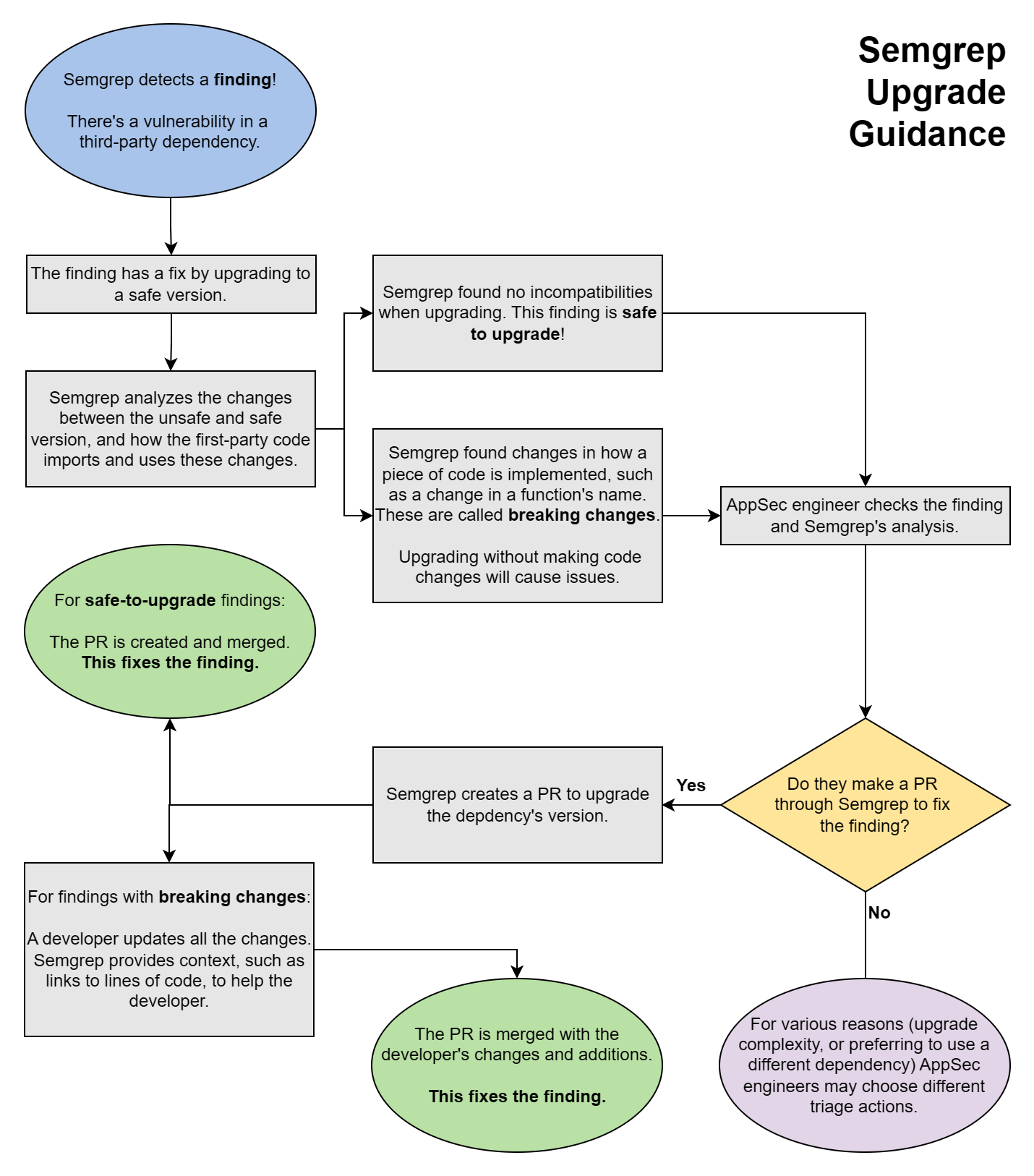
After enabling upgrade guidance, Semgrep performs post-scan analysis and marks applicable findings as **Safe to upgrade** or with **Breaking changes**.
* This analysis is performed every **two hours** on the latest **full scan**.
* Only findings whose dependencies have **fixed versions** that resolve the vulnerability are marked by Semgrep as **Safe to upgrade** or with **Breaking changes**.
* Findings without any fixed versions have no badge; instead, they say **no patch available**.
The following chart illustrates the steps Semgrep performs, from scanning to analysis, and the actions you can take based on the advice it provides.
 ### Review a finding's upgrade guidance
To view detailed information about a finding in Semgrep AppSec Platform, go to the **Supply Chain** page. Locate the finding you want to review, then click **Details**.
The details page is divided into several panels:
* General information:
* The name of the package and a description of the finding
* Its reachability, whether it is direct or transitive, its CVE number, EPSS, and severity
* Its remediation version, if any
* Links to references
* A badge indicating if it can cause breaking changes or not (beta)
* Branch and finding history information
* Branches in which it can be found
* Where it was first detected
* AI analysis performed, if any
* Graphs and code:
* **Your code**: the source file in which a match was detected; the highlight indicates where the match was found
* **Dependency path**: displays the path of dependencies; useful when analyzing transitive dependencies
* **Pattern** and **Rule**: the pattern and rule logic that determined the match
### Open a pull request or merge request with fixes
Navigate to the **Details** page of the finding for which you want to make a pull request or merge request.
Click **Fix** > **Open Autofix PR**.
A pull request or merge request includes:
* The manifest and/or lockfile changes necessary to upgrade the dependency
* The context necessary for developers to fix potentially breaking changes
The following context is included in the pull request description:
* Summary
* Severity and reachability of the finding
* The specific version of the dependency that the PR upgrades to
* Vulnerability details
* A description of the vulnerability and links to its CVE references
* Upgrade guidance
* The files and functions in the code which make use of the dependency and likely include breaking changes
* Dependency references
* Release notes, changelogs, and commits of the dependency, which may be helpful to resolve the breaking changes
## Ignore findings
The **Supply Chain** tab allows you to identify reachable true positives so you can fix or resolve the related issues. However, you can ignore any false positives, acceptable risks, or deprioritized findings due to some factor. To do this:
In Semgrep AppSec Platform, go to [**Supply Chain**](https://semgrep.dev/orgs/-/supply-chain).
Select one or more findings.
Click **Triage > Ignored**.
Provide **Comments** to describe why you're ignoring the selected findings.
Click **Submit**.
## Block pull requests or merge requests
To prevent security vulnerabilities from being merged into your codebase, see [Supply Chain Policies](/semgrep-supply-chain/policies) for information on how to:
* Block pull requests or merge requests with security vulnerabilities
* Leave comments on pull requests or merge requests with security vulnerabilities
## Appendix
### Grant **Read and write** access to a private GitHub Semgrep app
Autofix PRs for Supply Chain use the same private GitHub App **Contents: Read and write** permission as [Autofix for Semgrep Code](/semgrep-code/triage-remediation/autofix). See [Grant code access to Semgrep with a private GitHub app](/semgrep-appsec-platform/scm-code-access#grant-code-access-to-semgrep-with-a-private-github-app) for setup steps. For GitHub Autofix API details, see [Autofix permissions](/deployment/prepare/scm-permissions#autofix-github-permissions).
### Connect a private registry to Semgrep
Sign in to [ Semgrep AppSec Platform](https://semgrep.dev/login).
Navigate to **Settings > Integrations**.
Click **Add**, then select **Registry**.
In the dialog that appears, provide the following information:
1. The **Name** of your registry.
2. The **Package manager**.
3. The **Authentication method**. If none is required, select **None (public registry)**.
* **Username and password**: provide the required **Username** and **Password**.
* **API token**: provide the required token value.
Optional: if your registry is only accessible from your private network, select **Use network broker for registry access**. This option requires a [Semgrep Network Broker](/semgrep-ci/network-broker) deployed within your network.
When enabled, Semgrep routes registry traffic through the broker, allowing Semgrep to access registries that are not publicly accessible on the internet.
For the broker to reach your registry, its allowlist must include the registry URL. See [Use Semgrep Network Broker for private registry access](/semgrep-ci/network-broker#use-semgrep-network-broker-for-private-registry-access).
Click **Connect** to save your changes and proceed.
### Troubleshooting: Semgrep is not displaying Upgrade guidance or Autofix functionality
If you cannot see any **Breaking changes** or **Safe to upgrade** badges or findings, this may be due to the following reasons:
* Your language or package ecosystem is not supported
* Your source code manager is not supported
* You have not set **Read and write** access for the **Contents** permission; see [Grant read and write access](#grant-read-and-write-access-to-a-private-github-semgrep-app)
* Your findings do not have safe versions to upgrade to yet
* You have no findings within the supported scope of this feature
### Review a finding's upgrade guidance
To view detailed information about a finding in Semgrep AppSec Platform, go to the **Supply Chain** page. Locate the finding you want to review, then click **Details**.
The details page is divided into several panels:
* General information:
* The name of the package and a description of the finding
* Its reachability, whether it is direct or transitive, its CVE number, EPSS, and severity
* Its remediation version, if any
* Links to references
* A badge indicating if it can cause breaking changes or not (beta)
* Branch and finding history information
* Branches in which it can be found
* Where it was first detected
* AI analysis performed, if any
* Graphs and code:
* **Your code**: the source file in which a match was detected; the highlight indicates where the match was found
* **Dependency path**: displays the path of dependencies; useful when analyzing transitive dependencies
* **Pattern** and **Rule**: the pattern and rule logic that determined the match
### Open a pull request or merge request with fixes
Navigate to the **Details** page of the finding for which you want to make a pull request or merge request.
Click **Fix** > **Open Autofix PR**.
A pull request or merge request includes:
* The manifest and/or lockfile changes necessary to upgrade the dependency
* The context necessary for developers to fix potentially breaking changes
The following context is included in the pull request description:
* Summary
* Severity and reachability of the finding
* The specific version of the dependency that the PR upgrades to
* Vulnerability details
* A description of the vulnerability and links to its CVE references
* Upgrade guidance
* The files and functions in the code which make use of the dependency and likely include breaking changes
* Dependency references
* Release notes, changelogs, and commits of the dependency, which may be helpful to resolve the breaking changes
## Ignore findings
The **Supply Chain** tab allows you to identify reachable true positives so you can fix or resolve the related issues. However, you can ignore any false positives, acceptable risks, or deprioritized findings due to some factor. To do this:
In Semgrep AppSec Platform, go to [**Supply Chain**](https://semgrep.dev/orgs/-/supply-chain).
Select one or more findings.
Click **Triage > Ignored**.
Provide **Comments** to describe why you're ignoring the selected findings.
Click **Submit**.
## Block pull requests or merge requests
To prevent security vulnerabilities from being merged into your codebase, see [Supply Chain Policies](/semgrep-supply-chain/policies) for information on how to:
* Block pull requests or merge requests with security vulnerabilities
* Leave comments on pull requests or merge requests with security vulnerabilities
## Appendix
### Grant **Read and write** access to a private GitHub Semgrep app
Autofix PRs for Supply Chain use the same private GitHub App **Contents: Read and write** permission as [Autofix for Semgrep Code](/semgrep-code/triage-remediation/autofix). See [Grant code access to Semgrep with a private GitHub app](/semgrep-appsec-platform/scm-code-access#grant-code-access-to-semgrep-with-a-private-github-app) for setup steps. For GitHub Autofix API details, see [Autofix permissions](/deployment/prepare/scm-permissions#autofix-github-permissions).
### Connect a private registry to Semgrep
Sign in to [ Semgrep AppSec Platform](https://semgrep.dev/login).
Navigate to **Settings > Integrations**.
Click **Add**, then select **Registry**.
In the dialog that appears, provide the following information:
1. The **Name** of your registry.
2. The **Package manager**.
3. The **Authentication method**. If none is required, select **None (public registry)**.
* **Username and password**: provide the required **Username** and **Password**.
* **API token**: provide the required token value.
Optional: if your registry is only accessible from your private network, select **Use network broker for registry access**. This option requires a [Semgrep Network Broker](/semgrep-ci/network-broker) deployed within your network.
When enabled, Semgrep routes registry traffic through the broker, allowing Semgrep to access registries that are not publicly accessible on the internet.
For the broker to reach your registry, its allowlist must include the registry URL. See [Use Semgrep Network Broker for private registry access](/semgrep-ci/network-broker#use-semgrep-network-broker-for-private-registry-access).
Click **Connect** to save your changes and proceed.
### Troubleshooting: Semgrep is not displaying Upgrade guidance or Autofix functionality
If you cannot see any **Breaking changes** or **Safe to upgrade** badges or findings, this may be due to the following reasons:
* Your language or package ecosystem is not supported
* Your source code manager is not supported
* You have not set **Read and write** access for the **Contents** permission; see [Grant read and write access](#grant-read-and-write-access-to-a-private-github-semgrep-app)
* Your findings do not have safe versions to upgrade to yet
* You have no findings within the supported scope of this feature